Acrylic Laser Cutting for Signage: Cast vs Extruded, Edge Finishes and Design Tips
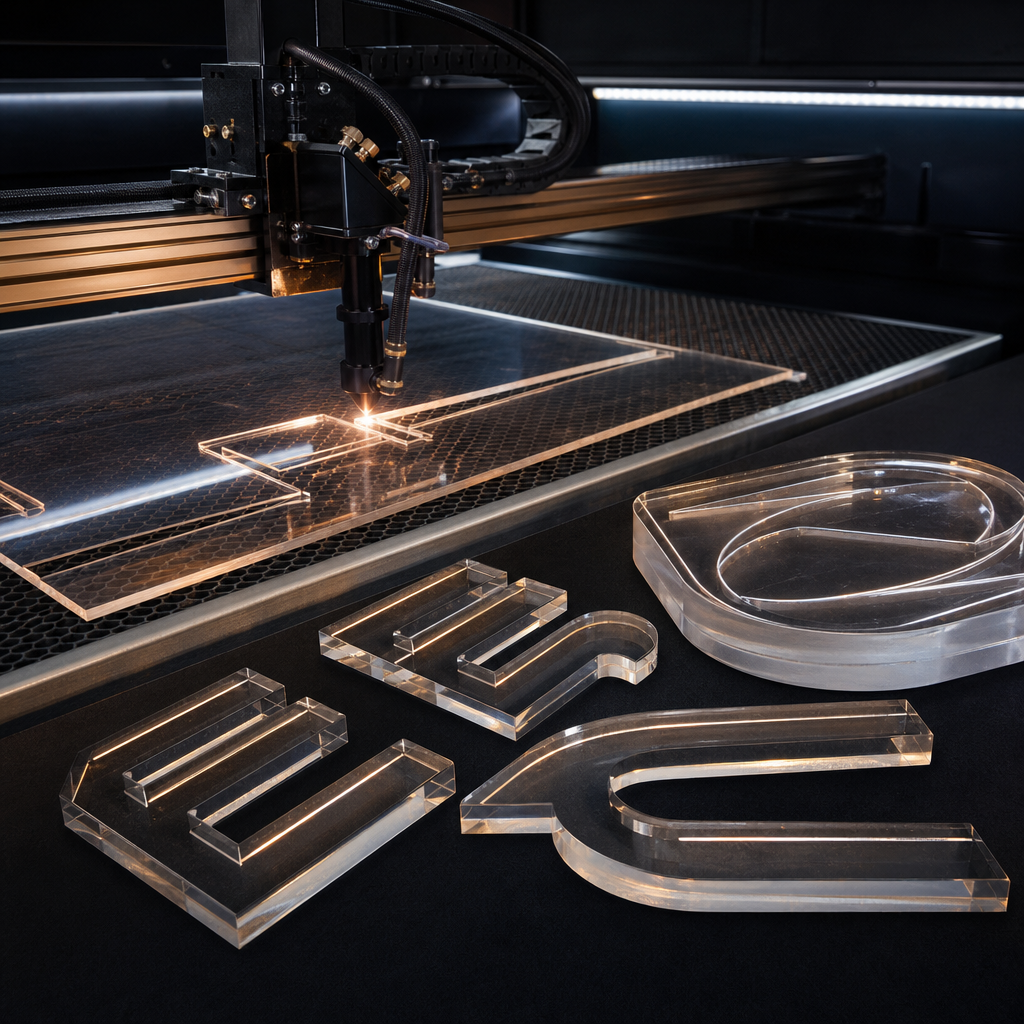
Acrylic laser cutting uses a CO2 laser to vaporise acrylic along a vector path, leaving smooth, often polished-looking edges with no tool contact. For signage, choose cast acrylic for engraving and bonded assemblies, extruded for cost-sensitive flat cuts, then match thickness, colour and fixing to where the sign will live.
Most acrylic sign problems are not cutting problems. They are specification problems: the wrong grade, the wrong thickness for the fixing, or artwork that was never built for a laser. Fix those three things before production and the job usually comes out right first time.
This guide is written for Queensland business owners, fit-out managers and designers who are specifying acrylic signs and want to understand the options before asking for a quote. It covers how acrylic behaves under a laser, which grade to pick, what edge to expect, how coastal conditions affect it, and how to prepare artwork.
Key Takeaways
- A CO2 laser cuts acrylic cleanly with no tool contact, which suits letters, logos and intricate shapes.
- Cast acrylic engraves frosted white and is the safer choice for bonded assemblies. Extruded is usually cheaper and gives a clearer cut edge.
- Opal acrylic is the standard choice for illuminated faces because it diffuses light evenly.
- On the Queensland coast, fixing method and allowance for heat expansion matter as much as the sheet itself.
- Send vector artwork, tell us where the sign will be mounted, and let us confirm sheet size and maximum thickness against our equipment.
- Thicker or larger pieces are often better routed on a CNC machine than laser cut.
Ready to make your business impossible to miss?
Design, manufacture and installation, all under one roof in Warana.
Get a Free QuoteSummary Table
| Decision | Options | Best suited to | Watch out for |
|---|---|---|---|
| Acrylic grade | Cast | Engraved logos, bonded assemblies, premium reception signs | Higher material cost |
| Acrylic grade | Extruded | Flat cut letters and shapes where budget matters | Stress cracking if solvent-bonded carelessly, weaker engraving contrast |
| Edge finish | Laser cut edge | Most flat signs and letters | Slight edge marking on some grades and thicknesses |
| Edge finish | Flame polished | Simple shapes where edge clarity is on show | Not suited to fine detail |
| Sheet type | Clear | Standoff panels, layered signs | Shows glue and fixings |
| Sheet type | Opal | Lightbox faces, backlit panels | Not for see-through applications |
| Sheet type | Coloured or mirror | Letters, accents, feature walls | Check outdoor suitability and scratch care |
| Process | Laser cutting | Detailed, thinner pieces | Thickness limits set by the machine |
| Process | CNC routing | Thicker or larger pieces | Corner radii limited by the cutter |
Why laser cutting suits acrylic signs
Laser cutting suits acrylic because the material absorbs CO2 laser energy and vaporises cleanly along the cut line. The result is a smooth edge, sharp internal detail and no cutter marks. The sheet is never clamped against a spinning tool, so thin letters and tight shapes are not stressed during cutting.
Three practical benefits matter for signage.
Edges that look finished. Acrylic melts and vaporises as the beam passes, so the edge often looks polished straight off the machine. For many signs, that means no secondary edge work at all.
Intricate shapes. The beam is very fine, so small counters in letters, thin script strokes and detailed logo cut-outs are achievable where a router bit would be too large. There is a limit, and we cover it in the design section below.
No tool contact. Nothing pushes against the sheet. Delicate pieces, such as a slim serif font or a perforated panel, are held flat on the bed and cut without the vibration that can chip or crack brittle material.
One honest caveat: the laser does heat the edge. That heat leaves tiny internal stresses in the cut face, which is relevant later when we talk about gluing and solvent bonding.
Cast vs extruded acrylic: which grade for which sign
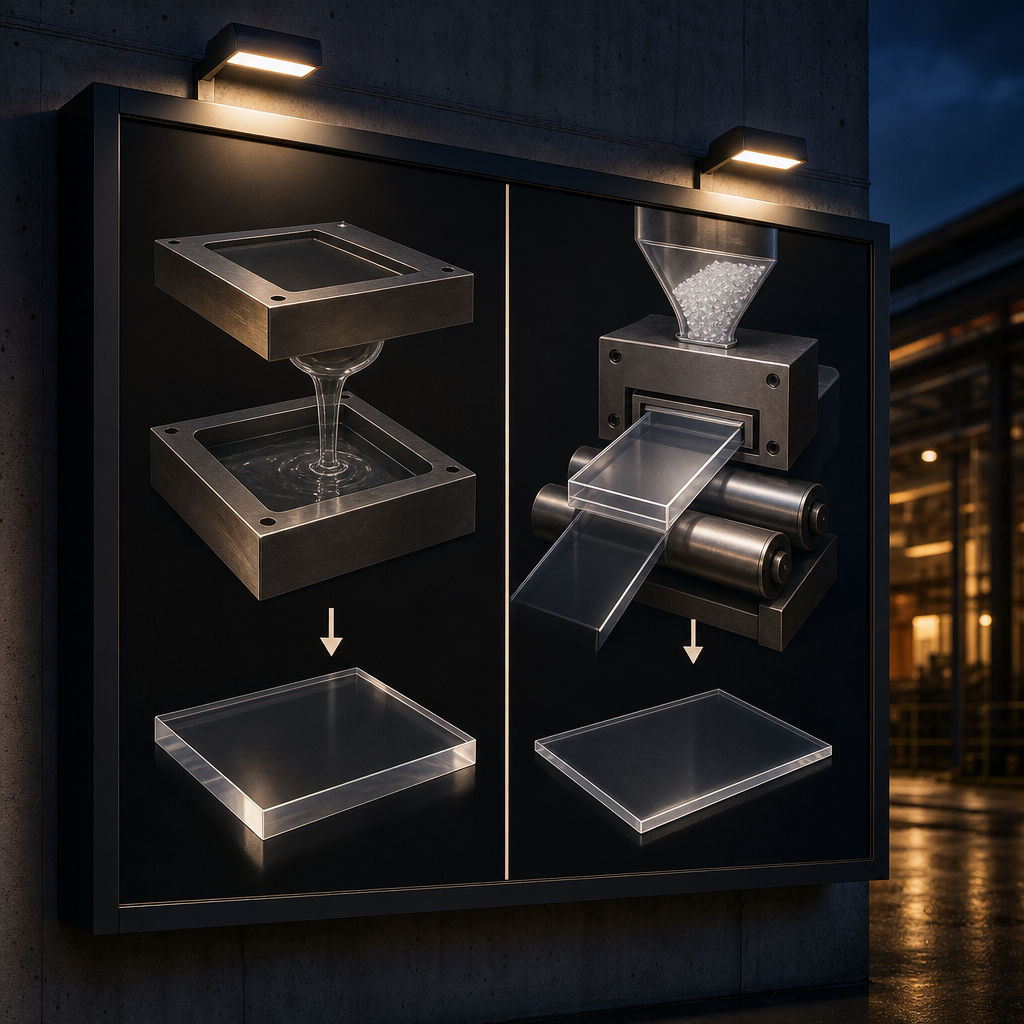 Cast acrylic is made by pouring liquid acrylic between moulds. Extruded acrylic is pushed through a die in a continuous process. Cast generally costs more, engraves with better contrast and handles bonding better. Extruded is usually cheaper, more consistent in thickness and gives a very clear cut edge.
The two grades look almost identical on a shelf. They behave differently once a laser or a bottle of solvent cement gets involved.
Cost
Extruded sheet is normally the lower-cost option, and for a flat cut letter set or a simple panel that is often the right call. Cast sheet costs more, and the extra spend only pays off if you use one of its strengths. Ask us for pricing on both grades when you send artwork, because the gap changes with colour and thickness.
Edge clarity
Extruded acrylic tends to give a very clear, glossy cut edge from the laser. Cast acrylic can leave a slightly less glassy edge, which can look a touch frosty on some sheets. If a clear panel will be viewed from the side, such as a standoff sign with the edge catching the light, that difference is worth discussing.
Engraving behaviour
Cast acrylic engraves to a frosted white finish. That gives strong contrast on clear and dark coloured sheet, which is why it is the standard choice for engraved logos, room names and decorative patterns. Extruded acrylic engraves with less contrast and can look flatter or clearer, so an engraved logo may not read as strongly.
Stress cracking when glued or solvent-bonded
This is the one that catches people out. Extruded sheet carries internal stresses from manufacturing, and laser cutting adds more at the edge. Solvent cement can then release that stress as fine surface cracks, called crazing, sometimes hours or days after the sign leaves the workshop. Cast acrylic is generally more forgiving.
If your sign involves layered, bonded construction, such as stacked letters, a raised logo on a backing panel or a fabricated box, say so when you brief the job. The right choice may be cast acrylic, a different adhesive, or a mechanical fixing instead of glue.
Edge finishes: laser cut edges and flame polished acrylic edges
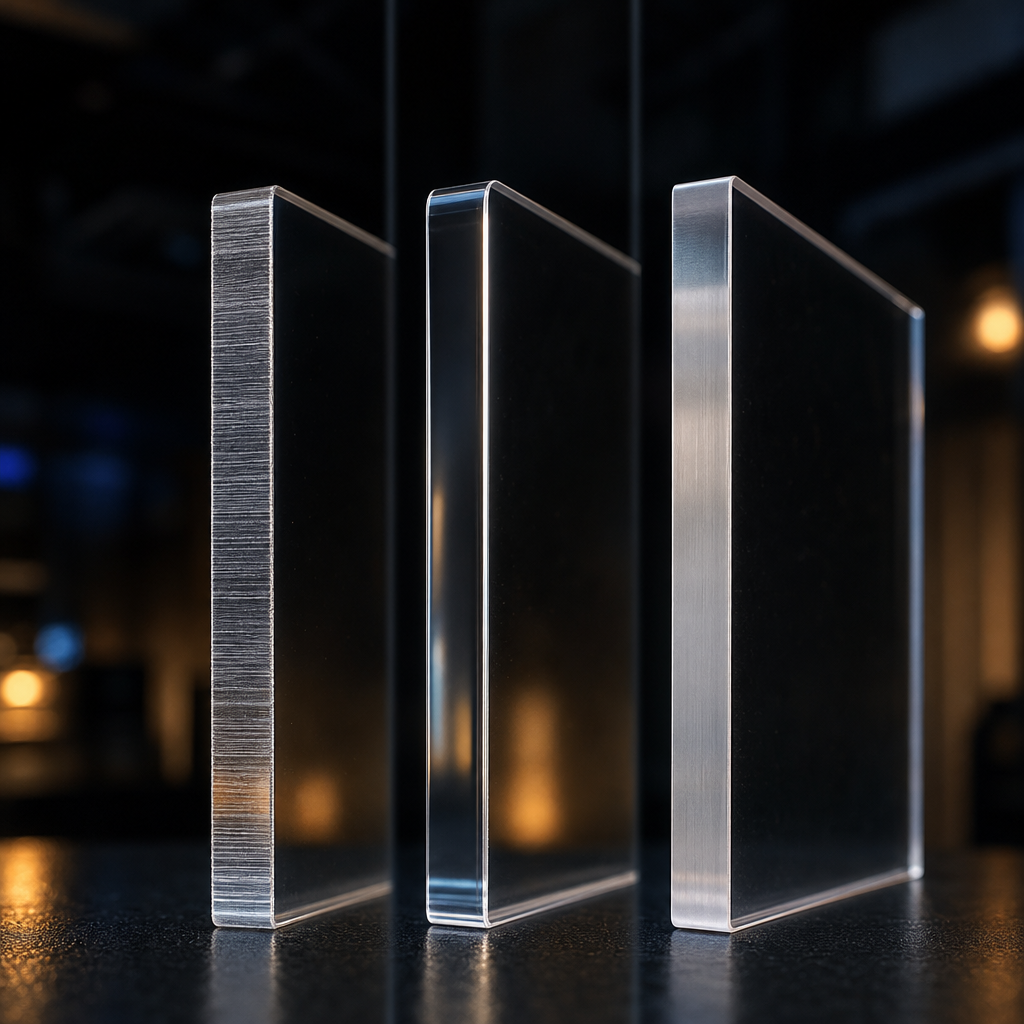 A laser cut acrylic edge is often clear enough to leave as it is, especially on thinner extruded sheet. Flame polishing passes a flame along the edge to melt it smooth and glossy. It suits simple shapes where the edge is visible, but it can round fine detail and add stress.
There are three finishes worth knowing about.
Laser cut edge. The default. It is smooth and glossy on many jobs. On some grades and thicker sheet you may see slight lines or a faint frosting. For flat letters mounted against a wall, the edge is barely noticed.
Flame polished edge. The edge is run past a flame so the surface melts and levels out. It produces a clear, glassy edge and is most useful on thicker or routed pieces where the cut face is not already clean. It works best on straight runs and gentle curves. Tight internal corners and thin strokes do not suit it, because heat softens and rounds fine detail.
Polished or machined edges. On thick pieces cut on a CNC router, edges are usually machine or diamond polished rather than laser finished. If a thick clear panel is the hero of your reception area, ask which edge treatment we recommend.
Polishing is also not free of side effects. Applying heat to an edge adds stress, which loops back to the cast vs extruded discussion. If a piece will be flame polished and then bonded, we want to know before we choose the sheet.
Thickness, colour and finish choices
The right thickness depends on size, fixing and how the sign is viewed. Thin sheet suits small letters and detailed plaques. Thicker sheet gives panels and dimensional letters a more substantial look. Maximum thickness and sheet size depend on our equipment, so please ask the team to confirm before you finalise a design.
We do not publish a single maximum because it changes with the machine used and the grade of sheet. What we can say is how to think about the choice.
Thickness
Match thickness to the job rather than the look on screen. Large panels need enough thickness to stay flat and carry their own weight. Dimensional letters need enough depth to cast a shadow and look substantial. Small detailed plaques can be thin. If your design is bigger or thicker than the laser bed handles comfortably, the answer may be CNC routing instead.
Clear acrylic
Clear sheet is the workhorse for standoff-mounted panels, layered signs and anything with printed or applied graphics on the back. It shows fixings, adhesives and wall colour, so the finish behind it matters.
Opal acrylic
Opal, also called white diffuser, scatters light. It is the standard choice for illuminated faces because it hides individual LEDs and gives a consistent glow. It is not for see-through uses. Poorly matched opal and LED spacing causes hot spots, so the depth of the box and the lighting design matter as much as the sheet.
Coloured and mirror sheet
Coloured acrylic is cut for letters, shapes and accent pieces, and the colour runs through the sheet so cut edges do not show a different tone. Mirror acrylic gives a reflective finish for feature signs and lettering. Mirror sheet scratches more visibly and needs care in handling and cleaning, and it is worth confirming suitability for outdoor use before choosing it for an external sign.
Signage applications we cut in acrylic
Acrylic laser cutting is used for reception logos, standoff-mounted panels, dimensional letters, lightbox diffusers, and compliance and wayfinding plaques. These are the jobs where fine detail, clean edges and consistent flatness matter, and where design, fabrication and installation can all be handled in one place.
Reception signs and logos. Laser cut acrylic letters and logos, mounted on a feature wall, are one of the most common requests. Layering two or three colours or thicknesses adds depth without much extra complexity.
Standoff-mounted panels. A cut or printed acrylic panel is held off the wall on standoffs, giving a floating look and a shadow gap. The fixing hardware is visible, so its finish and spacing are part of the design.
Dimensional letters. Individually cut letters, either flat or stacked, for shopfronts and interior walls. For outdoor illuminated letters, our LED channel letter work is a different build, but acrylic faces are often used in those assemblies.
Lightbox diffusers. Opal acrylic faces for lightboxes and backlit panels. If a lightbox is part of your signage plan, think about access for cleaning and lamp or LED replacement, which falls under illuminated sign maintenance.
Compliance and wayfinding plaques. Room numbers, directional signs, exit and facility plaques. Where a sign must meet accessibility or safety requirements, such as tactile or Braille signage, the National Construction Code and referenced Australian Standards set the rules. Confirm requirements for your building before ordering.
Here is a simple illustration. Consider a professional office on the Sunshine Coast that wants its logo on the reception wall. A sensible build might be a cast acrylic logo with engraved detail, cut in two colours and stacked for depth, then fixed to the wall with concealed pins. The same office might add small laser cut wayfinding plaques for meeting rooms in a matching material, so the whole fit-out reads as one system. That is a hypothetical example, but it reflects how these jobs are normally scoped.
Outdoor performance on the Queensland coast
Acrylic performs well outdoors, but coastal Queensland tests it with strong UV, heat and salt air. Quality sheet is made for UV exposure, yet the sign still expands and contracts with temperature. Choose weather-suitable sheet, allow movement in the fixings and avoid rigid, over-tight mounting.
UV exposure. Queensland has high UV levels for much of the year, as monitored by agencies such as ARPANSA and the Bureau of Meteorology. Acrylic is generally regarded as having good UV resistance, but colour stability varies between products and colours. For external signs, ask us to confirm that the sheet and colour suit outdoor use.
Heat expansion. Acrylic expands and contracts with temperature more than metal or glass. A long panel in direct sun will grow slightly through the day. If fixings clamp it rigidly, that movement can cause bowing, stress or cracking around holes. Oversized or slotted holes, and fixings that are snug but not crushing, let it move.
Fixing methods. Common options include standoffs, concealed pins, stud fixings and structural adhesive tape, depending on weight and surface. Masonry, render, cladding and timber each need different anchors. Salt air attacks cheap hardware, so stainless fixings are the sensible choice near the coast.
Cleaning and care. Salt, dust and bird droppings build up on exterior signs. Soft cloths and mild detergent suit acrylic, while abrasive pads and harsh solvents leave scratches or haze. A cleaning routine is part of keeping a sign looking new.
For jobs on the Sunshine Coast, Maroochydore, Caloundra or Hervey Bay, tell us the exact mounting surface and how exposed the position is. A sign facing afternoon sun over a car park lives a harder life than one under an awning.
Artwork and design tips for laser cut acrylic letters
Send vector artwork, keep strokes and bridges thick enough to survive handling, and allow for the width of the laser beam. Small details that look fine on screen can be fragile in acrylic. The best approach is to send your logo early and let us flag problems before cutting.
Use vector files
Lasers follow paths, not pixels. Supply artwork as vector files such as AI, EPS, SVG or PDF with live paths. A JPEG or PNG logo has to be redrawn before it can be cut, which adds time and the risk of subtle changes. Convert text to outlines so fonts do not substitute.
Minimum stroke widths
Very thin strokes snap, bend or lose their shape once the sign is handled and fixed. Thin script fonts and fine hairlines are the usual offenders. As a general rule, the thicker the sheet, the heavier a narrow feature needs to be. We confirm minimum widths against the material and thickness once we see your artwork, rather than quoting a single figure here.
Allow for kerf
Kerf is the thin strip of material the beam removes as it cuts. It is small, but it matters where parts fit together, such as an inlay, a slotted tab or a letter set into a cut-out. Design joins with a little tolerance, or tell us which fit you want and we will compensate. Kerf varies with machine, material and thickness.
Watch the islands
Letters like O, A, B and R have inner islands. In a stencil-style cut those islands fall out unless bridges are added. For solid letters this is not an issue. For stencil lettering or cut-out panels, plan bridges in the design.
Plan the fixing early
Holes for standoffs, pins or studs should be positioned in the artwork, with enough material around them. A hole too close to an edge is a crack waiting to happen, especially in extruded sheet.
When CNC routing is the better choice
Laser cutting suits detailed work in thinner sheet. When pieces are thicker, larger or need a heavy polished edge, CNC routing is often better. A router cuts thick acrylic without the heat build-up that causes marking or tapered edges, and diamond polishing then gives a glossy finish. The trade-off is that the cutter has a radius, so very tight internal corners and ultra-fine detail are limited. Our article on CNC cutting tolerances and material capabilities explains this in more depth. Describe your design and we will recommend the process that suits it.
Why we say brief the fixing before the font
Most people brief an acrylic sign by describing how it should look. In our experience the better first question is how it will be fixed, cleaned and replaced. The fixing decides the thickness, the thickness decides the process, and the process decides the edge. Start at the wall and work back to the artwork.
Here is the contrarian part: we think the cast vs extruded debate is overplayed for flat signs. If a sign is a flat cut letter set, mounted dry with pins or tape, extruded is often perfectly good and saves money. Cast earns its price when the job involves engraving contrast, bonding or flame polishing, where the risk of stress cracking or weak engraving is real.
The jobs that go wrong are rarely about the sheet. They are the ones where nobody asked what the sign would be fixed to, whether it faces afternoon sun, or who would clean it. A reception sign glued to a feature wall with the wrong adhesive can craze. A long outdoor panel clamped tight can crack at the holes. Neither is a laser problem.
So when we scope a job, we ask these questions in this order:
- Where does it go, and what is the surface?
- Is it indoors, outdoors, or lit?
- How is it fixed, and could it be removed later?
- What does the edge need to look like up close?
- Only then: which grade, thickness and colour?
That order stops most rework before it starts.
How to brief a laser cut acrylic sign job
A good brief covers the artwork, the location, the fixing and the finish you expect. With those four things, we can recommend a material and quote without a string of follow-up questions. You do not need to know the technical answers, just the situation.
Include these in your enquiry:
- Logo or artwork in vector format, or the best file you have
- Approximate size and where the sign will be installed
- Indoor or outdoor, lit or unlit
- The mounting surface (brick, render, plasterboard, glass, timber)
- Colours or finishes you have in mind
- Any compliance requirements, such as tactile or accessible signage
- Timeframe and number of signs
We handle design, fabrication and installation in-house, so one conversation covers the whole job. For related sign types, see our business and shopfront signs and our interior, wayfinding and compliance signs.
Ready to start? Send your logo or artwork to Sunquest Signs and we will come back with a material recommendation and a quote for your laser cut acrylic signage. Design, fabrication and installation are all handled in-house, so you deal with one team from first sketch to final fix.
References
- Australian Building Codes Board, National Construction Code: https://ncc.abcb.gov.au/
- Standards Australia, Australian Standards catalogue: https://www.standards.org.au/
- ARPANSA, Ultraviolet radiation information: https://www.arpansa.gov.au/
- Bureau of Meteorology, UV index and sun protection information: http://www.bom.gov.au/
Talk to a signage expert
Tell us about your project and we'll come back with options and honest advice.
Get in TouchFrequently Asked Questions
What is the difference between cast and extruded acrylic?
Cast acrylic is poured into moulds and extruded acrylic is pushed through a die. Cast generally costs more, engraves to a frosted white with better contrast and is more forgiving when bonded. Extruded is usually cheaper and gives a very clear laser cut edge, but it is more prone to stress cracking with solvent cement.
Can laser cut acrylic signs be used outdoors?
Yes, with the right sheet and fixings. Choose acrylic suited to outdoor use, allow for heat expansion with slotted or slightly oversized holes, and use stainless fixings near the coast. Tell us how exposed the position is, and we will recommend a suitable material and mounting method.
What file format do I need for laser cut acrylic letters?
Send vector artwork such as AI, EPS, SVG or a PDF with live paths, with text converted to outlines. Lasers follow vector paths, so raster files like JPEG or PNG need to be redrawn first. If you only have a low-resolution logo, send it anyway and we will advise.
How thick can acrylic be laser cut?
It depends on the laser equipment and the sheet being cut. Maximum thickness and sheet size are set by our machines, so please ask the team to confirm for your design. For thicker or larger pieces, CNC routing is often the better process.
Does laser cut acrylic need polishing?
Often not. A laser cut edge on acrylic is frequently smooth and glossy enough to leave as it is. Flame polishing or diamond polishing is used where the edge is highly visible, or on thicker pieces. Polishing suits simple shapes better than fine detail.
Related Articles
Pylon Sign Engineering and Installation: Footings, Wind Loads, Certification and What Happens on Site
Illuminated Pylon Signs: Lighting Options, Running Costs, Council Rules and Maintenance
Sunshine Coast Signage Project Gallery: Real Local Sign Installs by Suburb and Sign Type
Signs that set you apart
Over 40 years on the Sunshine Coast. Design, compliance, manufacture and installation handled end to end.
Get a Free Quote